Showing posts with label APRS. Show all posts

Sunday, 24 January 2021

Reviving my WX station, now with RTL-SDR.

 I've setup my WX station (Maplin version of WH1080) for quite sometime now but since last year, it went down due to few reasons. One of it, because the problem with the intermediary software between the WX base station and aprs server. Anyway, the outdoor unit still out there, transmitting it data over 433.920Mhz freq. 

Had a bit of time yesterday, and I've received the BNC to SMA jumper cables that I ordered through Shoppe few days back, so no reason not to go ahead with this. My Raspberry 4 mini-server is under-load anyway, and the RX only multi-coupler given by Weerut has been laying down collecting dust for quite sometime. 

What needed to get the SDR to receive the WX data from WH1080 is a software called rtl_433. This software runs on my Raspbian without a problem and it could actually receive many other devices that use 433MHz frequency. 

To get started, I was using the instructions found in :

GitHub - matthewwall/weewx-sdr: weewx driver for software-defined radio

Few things needed to be changed since the rtl_433 has been updated, WH1080 support has changed too. The weewx-sdr won't work out of box. The following changes still not available in the final code. 

Resolve #79 - new model name and wind fields in RTL-433 V20 by mitchins · Pull Request #88 · matthewwall/weewx-sdr · GitHub

To be able to send the output into aprs, I'm using the setup that I've had since 2015. This extension is a modified code, not written by me but it works great my setup. My write up on the weewx2aprx can be found here.

9M2TPT / KT2O / M0HIK: Getting your WX station out to RF using weewx + aprx

My current setup as below ( yes, I'm using multi-coupler for my setup which is connected to Diamond D190).


Oh am going to redo the power into the multi-coupler, it kind of dangerous using the croc-clip for it for sure :)


Wednesday, 22 May 2013

Maplin N96GY(WH1080) WX station + APRS

During my trip back to Manchester last month, I've got myself a cheapo WX station. Sold by Maplin under it's Maplin Gadget brand with N96GY model, I made to understand by reading some of the documentation found in Maplin website, it is an OEM from Fine Offset Electronics which produces few variants of the WX station with USB connectivity. I was a bit hesitate to buy it at first since 1) it is cheap 2) getting it to connect to a router will be a hassle. After few more research, I found out that there is a package called FOWSR available for OpenWRT and the price paid might be worth it to get it up for a year or so before getting something better/more expensive.


Assembling the unit is a no brainer, don't think you need to look at the manual to get the outdoor unit assembled. I've got it mounted on my porch since my house only has a small garden. For those who're thinking of putting a weather station, you should follow the one suggested here:

http://wiki.wunderground.com/index.php/PWS_-_Siting

Anyway, the next hurdle is to get FOWSR to talk to aprs-is server. The FOWSR software was developed quite sometimes back and it hasn't been enhanced further. It supports the following format:
Left from the supported format is the APRS/CWOP format. I was looking to enhance the FOWSR but I couldn't get some of the libraries to compile properly using OpenWRT SDK (couldn't find this lib: libusb-compat), I might need to get the full source and recompile everything. But lucky me, I found someone using the same weather station + fowsr and his WX packet can be found on the aprs.fi. Emailed the packet owner, Nick (VA3NNW) to get more information on how he got his stuff running and he sent me a perl wrapper code that will reformat wunderground format into APRS/CWOP format. Thanks Nick for your help .. my WX station is up and running now and can be found here:

http://aprs.fi/weather/?call=9M2TPT-13

BTW, I've a workaround to have the WX packet to back-feed into the RF, by using aprx. What need to be done is to put a filter in section and in the section. If I ever get the OpenWRT SDK working, I might use it to output into a text file and let aprx to beacon out from the text file, this will then get picked up by other igate and into the aprs.fi. But for now, my current setup is working just fine.

I've modified Nick's perl script a bit to output a file into a /tmp directory instead of sending it direct to the APRS-IS server. I'm using aprx to beacon out from this text file into RF and back into aprs-is from someone's igate. This is now work well.

Nick has changed a bit on how his scripting works now, he is using CGI. For those who're interested in Nick's perl script, do head up to his page at:

http://noseynick.net/wx/noseywx.html


Thursday, 16 May 2013

MODIFICATION: Embedding GPS into TMD710A's head unit

My Garmin NUVI 350 has been intermittently giving me a problem which I believe caused by the power connector. For some reason, slight movement will cause the NUVI to loose it power. So, I'm retiring my NUVI, will still use it for day-to-day navigational (sourcing the power from the right side connector) and I've embedded a GPS module inside my TMD710A's head unit instead.

It is a straight forward project, that is after I did some "research" on the net and found few who've done it before. I based my mod from the this website: http://sq3fyk.com/?page_id=23

Here are the photos taken from the mod.

1. Scarifying my PS/2 serial GPS. Removed the casing, we're interested on the inner module which has both, the antenna & GPS receiver module.


2. Fully stripped, no only bare module & pig tails connector, left a good length of wires for the mod.


3. Trying to find the best place based on the website that I referred to, but decided that I don't want to loose the speaker.


4. Stripping the head unit, the volume & menu buttons etc, put them all into a safe container.


5. Okay, found the best place to stick the GPS, hopefully it won't fry the chip below it.


6. All wired ..  you can visit the website mentioned above on where the connection needs to be done.


7. Test it first before putting back the casing .. everything seems to work, no short-circuit.. :)


8. Done! Tested working, has been few months now.


Monday, 17 January 2011

Working in APRS packet mode with ISS

I'm just into this, working in APRS packet mode with ISS. Many of my friends who actively involved with APRS have worked with ISS before but for some reason, I've left behind. Not until few days ago when finally, my beacon is heard, repeated and s-gated from ISS to satellite APRS gateway and finally showed up in ariss.net. My setup won't allow me to communicate with ISS BBS system nor messaging since I'm 'misusing' aprx (meant to be as internet gateway for APRS) to send the beacons. I'm still looking for a terminal based software which can run on Linux to experiment further with the BBS and what nots.

Anyway, thanks to many of my friends, now I know that I could track the ISS using SatScape (Java) that could be run from any operating system (I'm running Mac OSX Leopard). And now I learnt that using WIDE1-1, WIDE2-1 while working with ISS is not advisable. Bob has suggested that we should use ARISS, APRSAT or WIDE as per his FAQ found here.

Here is the first time my callsign appeared in ariss.net:

Wednesday, 3 February 2010

WL-500G as an APRS igate

Last week, 9W2DIE passed his Asus WL-500G to me with the hope that I could convert it as an APRS igate. This router has a single USB port which could take most USB devices connected to it, surely, with the correct firmware and kernel modules loaded. After few days, at last, I managed get it to work.. so what do we need to give this old router a new life?

1. X-WRT/OpenWRT 8.09 or later firmware, 2.4 kernel is good enough (openwrt-brcm-2.4-squashfs.trx)
2. PL2303 USB-Serial converter (Belkin or FTDI should work fine too.. but not CH314 which we need kernel 2.6 for it)
3. Load of patience

Loading the x-wrt/openwrt firmware is a straight forward by following this guide. We need to use tftp though, I've no idea if we could upgrade the stock firmware with the x-wrt one using the web interface, but no harm trying.

After we've successfully uploaded the new firmware, we need to add few extra stuffs to make the USB works. Go to web interface, under System->Packages, add usb-ohci, usb-serial and the correct kernel module for the USB-Serial converter .. since I was using PL2303, so the usb-serial-pl2303 is the right module to be installed. Attaching the USB-Serial converter should load the pl2303 kernel module automatically.

The rest of the setup should be the same as the one found here.

No hardware modification needed for this router, not like the Linksys WRT54G series. Any TNC which supports KISS mode should work just fine. I've tested the Byonic's TinyTrak4 and probably will try Argent Data's OT1+ this weekend (if we've another TT).

As of now, we've successfully converted Linksys WRT54GL and WL-500G for iGate usage. The good thing about using the router is, it can still be your normal wireless router + it can acts as your igate too. Killing two birds with one stone .. and it saves your electricity bill too ..

NOTE: Migrate to aprx and your headache with aprs4r + ruby = not enough memory will be a history. As per Eric comment below, you could run aprx on most routers that can run openwrt and have USB port. Head up to the following website where you could download the compiled firmwares with aprx 2.01 included:

http://www.kissoz.dk/index.php?option=com_content&view=article&id=50&Itemid=57

Friday, 29 January 2010

Nothing much to write but something to share..


Yesterday,  someone named Fred in tracker2 mailing list sent this link to the list .. it is an interview done by  revision3/hak5 online with N4PAT on APRS.

How to build APRS on the cheap - Video

Enjoy!!

Sunday, 13 December 2009

New mailing list for APRS users in Malaysia


It seems that the number of APRS users in Malaysia has been increasing steadily of late and as such, having a mailing list to discuss issues and suggestions to make APRS even better assimilated within the amateur radio operators is the best way. Currently, APRS is mainly concentrated in KL, Penang, JB and Kota Kinabalu with some others are coming up with the infra and slowly adapting.

From my past few weeks experience going around Peninsular Malaysia, it seems that the setup in Penang is more toward having one way igate, with JB following suite but I believe there is at least one working digipeater somewhere in Tampoi. Hopefully with this new mailing list, we could share our knowledge locally and discuss what the best to improve the adaptation of APRS among Malaysian radio amateur operators.


For those who're interested, our mailing list is: myaprs @ yahoogroups.com.

Wednesday, 4 November 2009

Moving igate to LHS ..

I see no point of me running WRT54GL/APRS4R since I've got my Linux Home Server running 24/7 now. I've problem with the combination last night when Weerut sent me a message saying that my igate was down .. and when I checked it, yes, it was down for few hours already.. somehow, it lost the serial connection to the TT4 and I need to restart the router to get thing back to normal. Will do the necessary configuration tonight but nothing much really need to be done.. I've aprs4r installed, just need to get the serial port working and that should be it.. and I guess the WRT54GL can now go to someone who really need it.. raise your hand if you need a standalone IGATE! .. this offer valid to local ham only!

Friday, 23 October 2009

Next Project (place holder for diagram)

It seems that I need to share my Nuvi350 with my wife when she needs it most.. I need a gps to feed into my OT2 .. and guess what, I've Holux GPSlim GR236 somewhere in my drawer .. needing attention.. it couldn't run on battery anymore, somehow, the circuitry went kaput quite a while back.. what I need now is a +5V feed into the GPS .. a TTL to RS-232 converter (which I think in one of my drawers too) .. Y cable and time to be spent on soldering stuff.

Found one good instruction on how to fabricate the USB->RS232 cable from the following source:

http://saimhe.avita.lt/hw/Holux-GR236-cable-RS232.png


Uploaded here since sometime it is hard to get into the above website.

Friday, 9 October 2009

MARES at HITB 2009


MARES was involved in the HITB 2009 to showcase its stuff especially on the APRS and satellite communication. Unlucky us, we couldn't get a team to come over to showcase their satellite stuff but we managed to have booth setup to promote amateur radio as a hobby and what APRS could do. I couldn't attend the APRS session on the second day of the event so I hope everything went great.. I know with 9M2SQL (the great man!!) and 9W2STT + the rest of the team, everything should be alright.

Anyway, some photos snapped by 9W2SUN and the gang. Sorry, was too busy setting up the UIVIEW and forgotten to snap some myself.

My entire digipeater/igate setup ported at the event:


Me with 9M2SQL & 9W2CTS busy setting up the booth in the first day ..

Monday, 14 September 2009

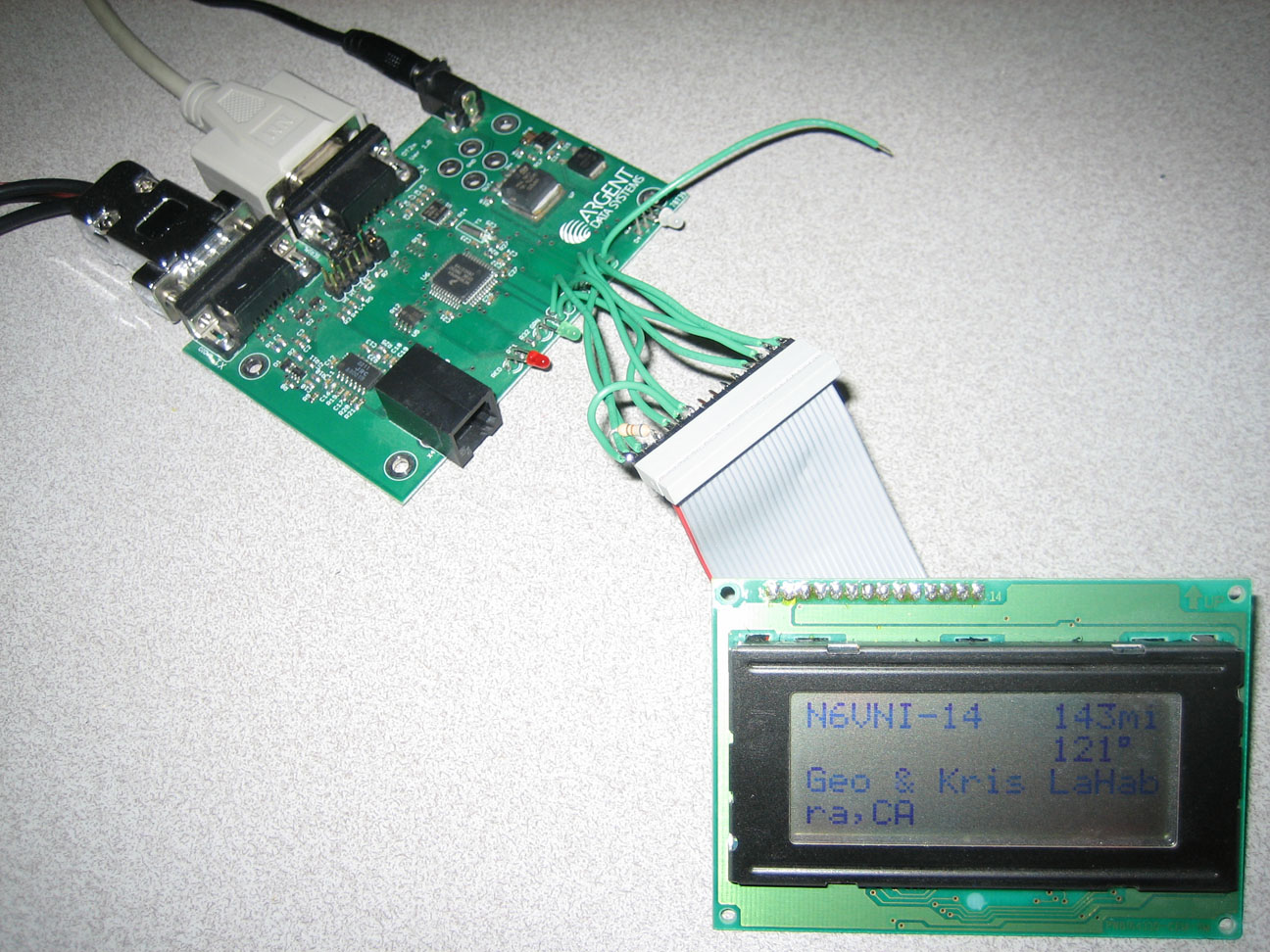
Tracker2 + LCD and poor decoding

I do sometime clear up the Favourite from my Nuvi350 but it left me wondering why it took so many packets before a single callsign pop-up in the Favourite list. Wonder no more .. after I added an LCD module to my setup I found out that most of the incoming packets were not recognised by Tracker2 eventhough they came with a very strong signal. I have no idea if this has to do with configuration or purely hardware problem. I've a TT4 which could decode most if not all packets it received but surely I need to tweak the configuration. In Tracker2 firmware, I could not find a way to do this. BTW, TT4 is connected to a Yaesu HT through an audio cable while the Tracker2 is connected to a Kenwood TMV71A through a data cable. I've played around with the audio level going through the PR1 pin on the Kenwood but it doesn't help much.


Anyway, since it is hard to get a suitable enclosure for the LCD display, I just epoxy-ed the exposed parts & traces on the LCD and 3M-ed it to my car's dashboard..

Update 1: It seems lowering the audio setting on PR1 pin/Kenwood data port does increase the number of packets decoded by Tracker2. The default setting was at 9, I reduced it to 6 before and now to 4. Probably it was over-deviation that causes the problem? I've no idea really but will monitor if this is the case.

Tuesday, 30 June 2009

Standalone digipeater & igate? I like the idea!!!

While browsing product availability at argendata website, I came across a daughterboard design for ot+ and wrt54gl. Hey, that could be an interesting mini project that I could take.. I've wrt54gl laying around collecting dust, it was supposedly my backup & working as WDS client for my home office but it doesn't work reliably .. so it was replaced by a Buffalo WHR-G125 instead.

I don't have an OT+, but I've TinyTrack4 that is connected to a PC running UI-VIEW32. Following the K6DBG website below, I could try to connect the TT4 via serial port.


Linksys built few WRT54G series of wireless routers with additional 10-pin header which we could use. This header gives a two TTL input/output ports. In order to convert this TTL signal, I need a MAX232 chip...

I will start this little project within this few days and see if I can get it anywhere.. now I can spare the old DELL PC that I bought to run UIVEW + sound card based interface for other usage ..

The guide to add serial ports to the router could be found here:

http://www.dd-wrt.com/wiki/index.php/WRT54GL_MAX232_Serial

Update 1: The internal .. RS232 interface ready ..


Update 2: I couldn't fit TT4 inside the casing .. added one DB9 to the front/face of the wrt54gl. There is one that should go to the side but will add it later on.

Update 3: Software wise, I've loaded OpenWRT/X-WRT Kamikaze (with disabled GUI interface) and APRS4R .. I need to configure it though.. that'll be the hard part I guess.

Update 4: Finally, it is up and running, some more photos to share:


Update 5: There seems to be a problem with the router running out of memory or something else, after running for a day, it just stuck there.. and not igate-ing any packets. Need to look into the log and see what happened.

Update 6: Solved this by having a cron job which kills the aprs4r process in every four hours.

Wednesday, 3 June 2009

TinyTrack4 & Display - mini project

Received my 20x4 display in the post today and spent half an hour trying to make it working. I messed up with the wiring for sure and scratching my head why it does not work .. yes, the RS and E pins were swapped .. silly me. Anyway, result .. as photos posted below (oh yeah, chosen this black over greenish LCD since it cost me only RM38/pc)...!
Next mini project will be, to put this display and TT4 into much better casing and to get the PS/2 keyboard interface wired up .. and to get the display working with OpenTracker2 too. If I fancy myself, might use STAMP2 but wondering if mine has serial memory built-in .. otherwise, I'll just wait a bit for Scott/ArgentData to come up with new firmware which has LCD/keyboard support.


Sunday, 24 May 2009

What is next in line?

My dear friend 9W2RUT is really testing me out .. he just bought two LCD 20x4 displays from Jalan Pasar .. that is enough to generate an interest to venture into new project for me. The Tracker2 and TinyTrak4 are both capable of displaying messages on 20x4 LCD. There are quite a number of LCD sellers on ebay, I'm aiming for the white-over-blue with backlight display.. RM42/pc sent from China .. not bad for the price since it cost more from Jalan Pasar. Probably will order it tomorrow :)

Info on how to get the LCD display working on Tracker2 could be found here: http://groups.yahoo.com/group/tracker2/message/5694. Photo posted by Scott:


And here is where all the information on how to get this thing working for TinyTrack4 (we need to have at least v0.51 firmware):


My hands are itchy now.

Sunday, 17 May 2009

TinyTrak4 as fill-in digipeater

I was thinking, why do I need to power on my PC when someone already gated the packets out to the net. What I want to do is to escalate/repeat packets sent by APRS stations from "Bermuda" area of Sg Buloh to the digipeater-to-be somewhere at Genting. Since I've Argendata Tracker2 already, I was thinking, why not try the Byonic TinyTrack4 and have it run in standalone mode and acts as a digipeater. So, ordered mine through 9W2PD (bulk order) and received it early of the week.

The hardest part for me is to set the TT4 to recognise incoming packets. When I received the TT4, I could not get it to recognise any packet, so put off by it .. I didn't touch it for few days (+ the busy days debugging BSP/ABAP Object/middleware and stuff related to work that it). To get it working with my FT-60R HT, I need to set the SQL all the way counterclock wise (off), set the volume to 25%, RXAMP and CDCODE and CDLEVEL as the configuration shown below.

My configuration is: Tinytrack4 + Yaesu FT-60R, configuration as I put into the software (Alpha 0.51 firmware), the important fields to get the digipeater working are in bold:

300 is FALSE
TXTDISP is FALSE
NODISP is FALSE
PPATHING is FALSE
DMSDISP is FALSE
MICETMV is FALSE
ENTS is FALSE
TELHIRES is FALSE
TELVOLT is TRUE
TELTEMP is TRUE
PREEMPT is FALSE
DIGIID is TRUE
TOSV is FALSE
TALT is TRUE
TIMESTAMP is TRUE
TIMEHMS is TRUE
SBEN is FALSE
TSWPT is TRUE
AMODE is TEXT
BMODE is TEXT
ABAUD is 19200
BBAUD is 4800
SSIDROUTE is 0
ALTNET is APTT4
MYCALL is 9W2TPT-4
DIGI1 is WIDE1-1
DIGI2 is WIDE2-1
DIGI3 is
PPATH1ST is
PPATH2ND is
TSTATUS is Digipeater SgBuloh
BTEXT is >Digipeater SgBuloh
BPERIOD is 900
TXD is 60
PERSIST is 65
SLOTTIME is 15
QUIET is 10
CDMODE is TONES
CDLEVEL is 12
TXLEVEL is 128
TXTWIST is 50
RXAMP is 13
GWAYLEN is 9
GWAYMODE is NMEA
LOCATION is 0312.8666N 10133.4500E
GALT is 1000
TSYMCODE is #
TSYMTABLE is S
STATUSRATE is 1
PPERIOD is 600
SBSSPEED is 5
SBFSPEED is 60
SBSPERIOD is 1800
SBFPERIOD is 90
SBTANGLE is 27
SBTSLOPE is 255
SBTTIME is 5
MICEMESSAGE is 0
TSOFFSET is 17
TDAO is 0
TPROTOCOL is APRS
TPERIOD is 1200
ALIAS1 is WIDE1-1
ALIAS2 is
ALIAS3 is
DUPETIME is 30
FILTERCALL is

Update: aprs.fi doesn't like the beacon text w/o '>', so, added it manually to the beacon text line.. don't see this with Tracker2 though.

Update 2: According to Byon, the only required parameter to enable the digipeater is the ALIAS1. The rest are just supporting parameters.

Sunday, 26 April 2009

Weekend adventures ..

Yeah .. yeah.. not into the wilderness but into my hams world. TPT will talk nothing but his hams world nowadays :) Anyway, worked on 10m with Pak Arif again, YC9MDX from Timor Island.. though I've heard few other stations, the pile up from other 9W2s.. so, forget it.. those hams were trying to get to Europe and we were seem to be disturbing them.. I wonder, when they specifically calling a region (e.g CQ Europe), should we interrupt them?

Anyhow, did my adventure into APRS world too. As per my previous posting, I have my Dell ready and I was using Rigblaster P&P from my FT897D as temporary APRS fill-in digipeater+igate. So, since I got from Mr Posto my FT60R's battery eliminator on Saturday, I spent my weekend trying to build the radio<->pc interface. I started on Friday evening and stayed up till wee hours in the Saturday morning and given up.. I could not get the PC to trigger the PTT line.. so, on Saturday evening, I started to look into it again.. replaced the optoisolator, wouldn't budge .. removed the diode, same thing, removed the LED .. same thing .. the voltage won't go to +5V as expected .. so .. took the connector off .. just the USB<->RS232 thingy.. guess what, AGPWE wouldn't trigger the CTS line high.. for whatever reason. Rummaged through my boxes of junks .. and found an RS232 cable .. good.. good.. and connect it to COM1 .. and guess what.. there.. the red LED on the FT60R lights up.. damn.. I spent hours to troubleshoot .. and it was the USB<->RS232 thingy that caused the problem. Reconstructed everything, clean up the mess I did on my table and underneath it .. and clean up the experimental box that contains the circuit that I did on a veroboard (sorry, I didn't shoot any photo before it went inside the box.. and too lazy to open up the box again..).. and photos here are the result of my hard work .. hi.hi.hi

!

The box.. will show the inside if I ever need to open it up.. yes, I use silicon glue to glue up the DB9 port there :) Left side goes to the radio and the two cables on the right go to PC.


The radio .. using battery eliminator .. and look closely, you see that I cut off the connector to the remote mic and replaced it with a pair of stereo plugs. I did it because it is a hassle to find a 4-pin plug which fits into the FT60R speaker/mic plug. So, there .. I could use both remote mic and the interface by unplugging one and replugging another to the female stereo plug. Surely, bad thing is to mix the power supply with my other rigs which somehow putting QRM on the receiving audio.. I tried putting that ferrite bead, helps a little.. need to get a separate power supply I guess.

Anyway, you could check the result here:

Saturday, 18 April 2009

Digipeaters - Klang Valley

Discussed this with 9W2RUT one day and it seems that we really need to sit down and do the necessary discussion about the PATH for digipeaters around Klang Valley area. For now, we do not have a wide coverage digipeater yet, the digipeater is ready to be commissioned and now I heard is awaiting approval from the site before it is up and running full-time. For now, this digipeater is running in test mode from 9M2CJ base. (Update: Saw 9M4RDG-1 in my UIVIEW terminal).

There are two other active digipeaters and one igate active and mine is, up when I want it to be :) My setup is more on fill-in digipeater with PATH set to be my alias and WIDE1-1. The others, I've no idea really, but I believe one is set as WIDEn-n and this seems to be repeating the packet sent by this wide-coverage digipeater to be. I'm planning to have a full time fill-in digipeater+igate up and running from my base and currently missing two main parts: 1) the antenna (might be able to use my mag-mount + Larsen ciplak on top of my air-cond compressor .. not a good idea but that might work just fine) 2) the interface between my HT to the PC .. what I've right now is .. 1) FT-60R which I need to get a battery eliminator 2) a newly bought old Optiplex GX60 PC running WinXP Pro (thinking of putting Linux but looking at the software available, I might want to stick with XP Pro). Software that I might choose, AGWPE (packet engine) and UIVIEW32 (for digipeater and i-digi).

Anyway, found this useful website: http://wa8lmf.net/DigiPaths/ which explains a bit more on this PATH thingy .. and I guess this will be a good reference for us.


Argent Data Tracker2 + Nuvi 350

Finally, after waiting for quite a while, I got my Nuvi 350 from my friend yesterday. Could not wait to test it out really. First try was early this morning, I supposed to meet someone to get a Dell Optiplex GX60 which should become my full-time fill-in digipeater/igate but the guy could not make it.. so, I went to Jalan Pasar to get the necessary thing for my fill-in digipeater instead.. and with the Nuvi 350 connected to the Tracker2. Not so good result since Tracker2 couldn't get any data sent to it.. I set the port to AUTO with the hope if I make a switch between the Garmin eTrex to Nuvi, it will be necessary to do any more setting up to the Tracker2.. I was wrong, so .. went ahead searching a quick guide on how to have these two devices talking to each other. Lucky me, found this helpful guide.

Using the otwingcfg.exe, I went ahead with configuring the Tracker2 and wallah.. it went alive and transmitted it first packet out w/o problem after setting the port to GARMIN. Fill up my afternoon time with tidying up the cabling and fixing the Nuvi. I drilled a hole on my dashboard so that there will be no cables criss-crossing on the dashboard. The result is quite neat.. judge it yourself from the following photos... enjoy..


Finally .. the track sent by my Tracker2 to igate.. looks nice too:

Friday, 20 March 2009

OpenTracker2 configured and tested

Received my OT2 from ArgentData last week but could not do much since I went back to my parents house on the weekend. I was determined to get it up and running since early of the week but due to my office workload, I delayed it until yesterday afternoon.

Installation was quite a straight forward actually and using the default setup on the OT2, what I need to do is just change the callsign. I did however turn on the smart beaconing so that it could transmit whenever I am turning.. this will avoid the track to show that I'm jumping from one location to the other.

During my first test, I was quite disappointed when my track was not shown on aprs.fi. A call to 9W2RUT revealed that there was no i-gate operating yesterday... only the digipeater worked but since no i-gate, it means, nobody relaying the packet to the internet. So .. yesterday night, with the help of google, I managed to configure my Lenovo S10 to become an i-gate. Tested it this morning when 9W2RUT igate was down and it seems that mine could actually relay the packets received from someone else digipeater.. yes.. one try and it works!

Anyway, here is my configuration right now:

1. ArgentData OT2
2. Garmin eTrex (soon will be replaced by Garmin Nuvi 350)
3. Kenwood TMV71A (set to transmit on Band B)

Photos will be posted once I've got my Nuvi 350.

Anyway, if you're lucky, you'll see me moving around .. click the following URL:

Friday, 23 January 2009

APRS craziness!

I've heard a lot about APRS but I'm yet to get into it. In recent months, the APRS community in Kuala Lumpur seems to be active and generates interest among local ham community. The first ever APRS digipeater is going to be up and running real soon now. And surely, your truly does not want to be left out. I've Garmin eTrex which I bought quite a long time ago (in July 2000 actually when I was in Houston TX) which I don't really use it. Been using it previously for navigation, using a software running on my Palm Vx (which I still have it somewhere in one of my many boxes of old stuff) and used it for geocaching activities when I was in UK (2002-2006). Now, it seems that I could put a good use to it .. by streaming my GPS position to strangers :D

Anyway, to make long story short, I was about to brew my own tracker board but I'm not easily satisfy with thing that is limited to sending out packet. I was looking high and low for a device which could encode and decode the APRS packet and display it on LCD display. While searching for it, I came across a tracker which has the features as what I wanted and more .. Argent Data's Tracker2 seems to be the perfect answer. And to my joy .. it seems that I could have it displayed not only on LCD .. but with certain Garmin Nuvi GPS (300, 700 and few other FMI series), I could actually display the other APRS stations on the Nuvi display as waypoint. And to add to my excitement, Nuvi 350 could actually send and receive APRS messages too.

So .. with all these information .. and after consulting the guru, I have put an order today for Tracker2 with Nuvi cable. I'm expecting it to be on my hand in a week or two.. a new toy to play with but I still need to find a Nuvi 350 which seems to have been discontinued .. someone is coming back from UK and I saw Amazon UK has it for £90 inclusive shipping .. will surely ordered it there and ask my friend to bring it back home.

I'm excited!!! Couldn't wait really .. yeah.. as always, to show off new toys.

Consuming EUDR Webservices from SAP ECC

There are number of us who're still stuck in the old SAP ECC or S/4 Hana on Premise and yet to move into Private or Public Cloud. A rece...