Showing posts with label unifi. Show all posts

Thursday, 19 May 2011

TM/Unifi - Replacing DIR-615 for good

Finally, managed to remove MicroTik Routeboard RB250G from my setup. The old WZR-HP-G300NH router finally get the much needed firmware upgrade to the latest OpenWRT Attitude Adjustment (r26915) bleeding edge release few days ago.  Someone has managed to get his DIR-825 working here and found that DIR-825 uses the same switch as WZR-HP-G300NH. I managed to add the VLAN tagging and VLAN port assignment manually using the same configuration, this was with the older RC release of OpenWRT that I've flashed many moons back.

I've no idea if this will work for other non-Atheros chip, but if you've a wireless router with the Atheros chip, feel free to get into the bleeding edge. Installation was surely not a straight forward, the trunk/bleeding edge releases are usually without Luci (GUI) preinstalled. You've two choices, one is to download the system upgradable release (sysupgrade) and flash your router from the web interface. All you configuration files will be intact if you go by this route, this includes the WAN and LAN interfaces. What you need to do is just to install Luci from opkg. But for those who're 'stupid' enough to go the hard way (as I've chosen to do), you need to download the packages upfront into your local server and point the opkg configuration to retrive the packages from your local server instead.

How to get Unifi working? Well, in the new Luci interface (yes, the Luci interface is much nicer too compared to the stable release), there is a Switch tab under the Network configuration page. This is where you configure the VLAN tagging and VLAN to port assignment.

Here is the sample of the page (yup, this is not mine.. someone has done this before, why reinvent the wheel :)..


From the above screenshot, your IPTV should be connected to the first port while the rest of the ports are free to be used as normal. Have fun flashing and configuring your router and good luck.

Note: I'm not taking any credit on this .. all thanks to the guy who posted this in lowyat forum as per the link above.

Sunday, 3 October 2010

TM HSBB/UNIFI & TM's D-Link DIR-615

NOTE: If you're looking for a total replacement for the DIR-615, klseet might be able to help you out.. head out to his website found here.

I met 9W2DAD today at MARES monthly radio flea market and first thing he asked, how to get the router that comes with UNIFI to work with his setup. Frankly speaking, I've half-ly ditch the router the day I got my UNIFI and as of last week, I've ditch it totally from my setup. TM doesn't know much about the router that it supplies to UNIFI subscribers and D-Link doesn't want to know either because it contains a non-standard firmware in there. Up to now, I've only come across few routers that are capable of VLAN tagging and remote access but D-Link isn't in the list that is available publicly. Most probably TM has contracted a company to come up with VLAN capable firmware for the D-Link hardware.

Anyway, what can we do if we still want to use our own router with D-Link as supplied by TM? Easiest is, to make it as a network bridge between the UNIFI supplied BTU and your router. This has been detailed in rizvanrp/rizzy's website found here. The way to configure the D-Link as network/VLAN bridge can be found here. Just follow exactly as what written there and you'll be good.

But how about if you don't want the D-Link to be in the equation there, you've two choices:

1. Get yourself with a WIFI router which is supported by DD-WRT and follow rizvanrp's guide on how to directly connect your WIFI router with the BTU which can be found here. This will make your iptv useless because you won't be able to direct iptv traffic to the setup box. You can check if your router is DD-WRT ready by checking this website.

2. Get yourself a switch which supports VLAN tagging and VLAN port assignment, the cheapest way is to get a Microtik RB250GS. Thanks to klseet from Lowyat Forum who managed the first and last bulk buy for this unit from Singapore. The local Microtik dealer won't entertain us with the RB250GS but you can always buy it direct from the Singapore supplier, check the post in Lowyat forum on how to order yours directly here. Oh, sure, you need help in configuring the RB250GS? Well, rizvanrp to the rescue once more and the guide can be found here.

Now with the last option, you can find where you throw your D-Link box, put everything back there, and store it somewhere. Just in case you need to return in back to TM/UNIFI.

Anyway, as an update, up to now, I've one big problem once just before Eid when suddenly all my download were corrupted (big download of over 10MB size). I switched off everything and when I tried to switch them back on, my BTU just couldn't sync with the back end server. Since I wasn't around during the Eid, my UNIFI was down for the whole week but back again after the TM techie came and reset everything. I was told that somehow my BTU was configured wrongly, now, my suspect is that it was compromised either intentionally by the techie staff from the backend after I reported slower speed or probably some punks who wanted to have some fun after knowing that all BTU are left open with default user/password on UNIFI network. Well, I don't know and I don't want to accuse anyone.. I'm happy as long as my UNIFI works.

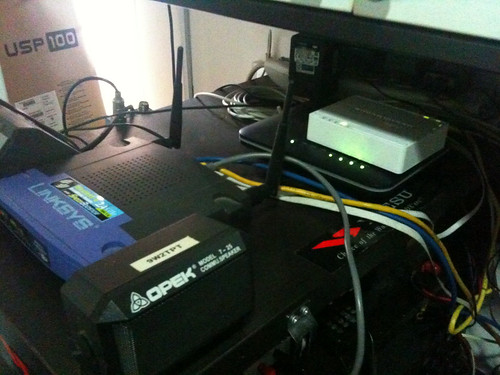
Here is my latest setup:


Sorry, a bit grainy, taken from my iPhone .. yes, I'm back to my trusty Linksys WRT-54GS (been running this router for 5 years already), it is now running latest DD-WRT firmware. The white box to right is the MicroTik RB250GS and underneath it is the Huawei's BTU. 

Update: Some of you might be looking for the default user/password for your TM's D-Link DIR-615, there are two user levels set by TM:

1. Username: admin / Password: either left blank (no password) or "telekom" (w/o quotes) or your UNIFI userid spelled backward.
2. Username: operator / Password: "telekom" (w/o quotes) or your UNIFI userid spelled backward. 

Please do check rizzy's website on securing your DIR-615 which can be found here.


Saturday, 17 July 2010

UNIFI

Sungai Buloh is one of the first few lucky areas which get the UNIFI after the trial run ended in June. And I believe I was among the first few who are 'lucky' to get it installed when it is made available from July 2010. The TM contractors had been working on the underground cables for quite sometime and I was excited the first time I saw..

Anyway, mine was finally installed on the 8th July, I've asked for earlier installation but they need to wait for the underground contractor to lay the final run from the nearest point to my house. Full installation took around 6 hours but I was told, some other places that don't require underground cabling, the installation team took much less .. 3 hours or less. Since I was on 4Mbps Screamyx Combo before, I guess I should go for the VIP5 which gives me 5Mbps down/up speed. 

What works and what doesn't? Well, the speed is surely much better than the 4Mbps that I had before, the upload speed will sometime reach the max too .. at almost 5Mbps. But the router that comes with the package is a bit PITA. After a day, I suddenly felt that the speed just gone really really slow .. did a speedtest and surely, it was less than 1Mbps and stuttering .. switching off and back on the router seem to solve this problem. Searching the net and I guess I'm not the only one having problem with this D-Link DIR-615 router. I was told that probably the connection limit on the router is set too low but there is no way that we can increase this.  After few searches, found the following guide on the net which allows me to replace the DIR-615 with my old WZR-HP-G300NH (running OpenWRT). 

http://unifi.athena.my/index.php?option=com_content&view=article&id=49&Itemid=61

This however doesn't let me to get rid of the DIR-615 once and for all.. the IPTV requires VLAN tagging to work and my WZR-HP-G300NH doesn't support (or I don't know how to configure the port based VLAN tagging) the VLAN tagging feature. But for now, my connection to the net works just like before, no slow down .. doesn't need to reset the router every day..! I was told that TM will start charging for certain channels on IPTV starting this August .. probably I'll just go and box the DIR-615 along with the IPTV box .. they channels that they have there a bit pathetic, CBeebies, some news channels that nobody gonna watch and Fashion TVs .. who on earth are going to watch those Fashion channels.. duh.. surely, I'm not going to pay for those channels.. and I've Astro anyway.. 

For now .. I still satisfy with the speed, but hey, UNIFI still doesn't have many subscribers yet, probably when they subscriber base increases, I will surely sure beach ball spinning when browsing the net. And hopefully TM will put the cap on the download so those pirates sucking the movies from torrent will not be able to hog the bandwith all day long.


Consuming EUDR Webservices from SAP ECC

There are number of us who're still stuck in the old SAP ECC or S/4 Hana on Premise and yet to move into Private or Public Cloud. A rece...